1curl -X POST 'https://api.budpay.com/api/s2s/test/encryption' \2 -H 'Content-Type: application/json' \3 -H 'Authorization: Bearer YOUR_SECRET_KEY' \4 -d '{5 "data": {6 "number": "4242424242424242",7 "cvv": "123",8 "expiryMonth": "12",9 "expiryYear": "28",10 "pin": "1234"11 },12 "reference": "1234567890"13}'Server to Server (Cards)
Here is a quick overview of how to integrate BudPay's Server to Server (Direct Charge API) for card payments:
- Collect Customer Information: Collect the customer's card details securely within your application.
- Card Encryption: Encrypt the card details using aes-128-cbc encryption algorithm.
- Initialize Transaction: Send the encrypted card details to S2S
initializeendpoint to initialize the transaction. - 3DS Authentication: If the card requires 3D Secure verification, we will return a URL to redirect the customer to complete the verification.
- Verify Transaction: After the customer completes the 3D Secure verification, you can verify the transaction using the
verifyendpoint.
Step1: Collect Customer Information
Collect the customer's card details securely within your application. Ensure that you are compliant with PCI DSS standards when handling card information. Here is an example of the card details you need to collect:
{
  "data": {
    "number": "4242424242424242",
    "cvv": "123",
    "expiryMonth": "12",
    "expiryYear": "28",
    "pin": "1234" // optional - only required for verve/local cards
  },
  "reference": "1234567890"
}numberThe customer's card number.cvvThe card verification value (CVV) on the back of the card.expiryMonthThe card's expiry month (2 digits).expiryYearThe card's expiry year (2 digits, e.g. "28" for 2028).referenceA unique reference for the transaction.
Step2: Card Encryption
Encrypt the card details using the aes-256-cbc encryption algorithm. Here is an example to do this:
Encryption Parameters
This section describes the parameters required for the encryption function:
| Parameter | Description |
|---|---|
data | The card details to be encrypted. |
key | The encryption key used to encrypt the card details, which is the BudPay public key. |
reference | A unique reference for the transaction, for this encryption, the first 16 digits of the reference are used as the initialization vector. |
iv | The initialization vector used for encryption, which is the first 16 digits of the reference. |
encryptionType | The encryption algorithm and mode used for encryption, which is aes-256-cbc. |
const crypto = require('crypto');

function cardEncryption() {
    const data = {
        number: "5123450000000008",  // Card Number
        expiryMonth: "10",           // Card Expiry Month
        expiryYear: "28",            // Card Expiry Year
        cvv: "100",                  // Card CVV
        pin: "1234"                  // (Optional - only required for verve/local cards)
    };

    const key = 'BUDPAY_PUBLIC_KEY'; // Encryption Key: BudPay Public key used for encryption
    const reference = "10033333333333333";  // 16 Digits Minimum

    const iv = reference.slice(0, 16);      // Initialization Vector: A fixed-size input for the cryptographic algorithm to ensure uniqueness
    const encryptionType = 'aes-256-cbc';   // Encryption Type: Specifies the encryption algorithm and mode

    // Convert key to Buffer for crypto library
    const keyBuffer = Buffer.from(key, 'utf-8');

    // Convert iv to Buffer for crypto library
    const ivBuffer = Buffer.from(iv, 'utf-8');

    // Create a Cipher object
    const cipher = crypto.createCipheriv(encryptionType, keyBuffer, ivBuffer);

    // Encrypt the data
    let encryptedData = cipher.update(JSON.stringify(data), 'utf-8', 'hex');
    encryptedData += cipher.final('hex');

    return encryptedData;
}

console.log(cardEncryption());
This function cardEncryption encrypts the card details using AES-256-CBC encryption and returns the encrypted data as a hexadecimal string.
Test Encryption Endpoint
We provided a test encryption endpoint to help you encrypt your card details.
The purpose of this test endpoint is to help you confirm that you are encrypting the card details correctly in your codebase before sending them to the S2S initialize endpoint.
Test Encryption Parameters
This section describes the parameters required for the encryption endpoint:
| Parameter | Description |
|---|---|
URL | https://api.budpay.com/api/s2s/test/encryption (opens in a new tab) |
Method | POST |
Content-Type | The content type of the request. Set this to application/json. |
Authorization | The secret key used to authenticate the request, set this to Bearer YOUR_SECRET_KEY. |
Endpoint: POST https://api.budpay.com/api/s2s/test/encryption

Test Card Encryption Response
The response will contain the encrypted card details. Here is an example response:
{
    "card": "83fa6763bb31bae36a74f787ab814514aeede91fcdb311fd67609b414c5e5ea2751a47870c8717e71bcbc9c33287a3d6af9ffae8e2edbf2de1e2694384d699b020d31492637eef60d7a63f303798363a"
}
Step3: Initialize Transaction
Send the encrypted card details to the S2S initialize endpoint to initialize the transaction. Here is an example of the request body:
Initialize Transaction Request
Endpoint: POST https://api.budpay.com/api/s2s/transaction/initialize
1curl -X POST 'https://api.budpay.com/api/s2s/transaction/initialize' \2 -H 'Content-Type: application/json' \3 -H 'Authorization: Bearer YOUR_SECRET_KEY' \4 -d '{5 "amount": "100",6 "card": "83fa6763bb31bae36a74f787ab814514aeede91fcdb311fd67609b414c5e5ea2751a47870c8717e71bcbc9c33287a3d6af9ffae8e2edbf2de1e2694384d699b020d31492637eef60d7a63f303798363a",7 "currency": "USD",8 "email": "test@email.com",9 "reference": "1253627873656276350"10}'Initialize Transaction Request Payload
{
  "card": "83fa6763bb31bae36a74f787ab814514aeede91fcdb311fd67609b414c5e5ea2751a47870c8717e71bcbc9c33287a3d6af9ffae8e2edbf2de1e2694384d699b020d31492637eef60d7a63f303798363a",
  "pin": "1234", // optional - only required for verve/local cards
  "amount": 10000,
  "currency": "NGN",
  "email": "test@gmail.com",
  "callback": "https://yourwebsite.com/callback",
  "reference": "1234567890"
}
Initialize Transaction Parameters
This section describes the parameters required for the initialize transaction:
| Header Parameters | Description |
|---|---|
URL | https://api.budpay.com/api/s2s/transaction/initialize (opens in a new tab) |
Method | POST |
Content-Type | The content type of the request. Set this to application/json. |
Authorization | The secret key used to authenticate the request, set this to Bearer YOUR_SECRET_KEY. |
| Request Parameters | Description | Type | Required |
|---|---|---|---|
card | The encrypted card details. | string | required |
pin | The card's pin. | string | optional - only required for verve/local cards |
amount | The amount to be charged. | string | required |
currency | The currency of the transaction. | string | required |
email | The customer's email address. | string | required |
callback | The URL to redirect the customer to after the transaction. | string | required |
reference | A unique reference for the transaction. | string | required |
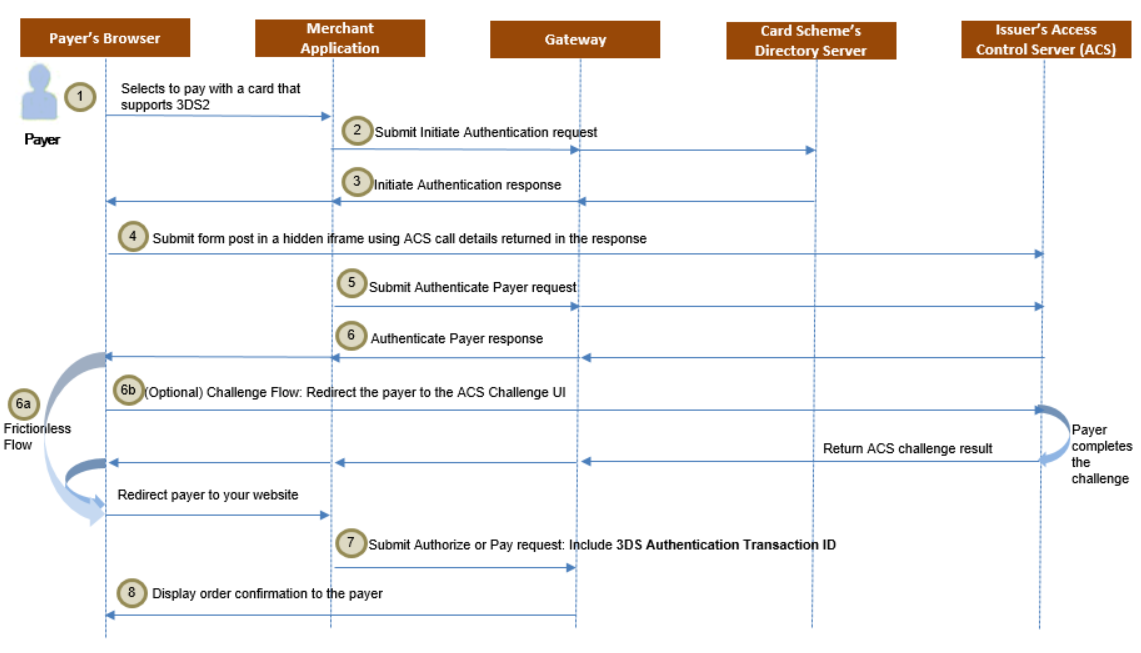
Step4: 3DS Authentication
If the card requires 3D Secure verification, we will return a URL to redirect the customer to complete the verification. Here is an example of the response:
3DS Authentication Response
{
    "status": true,
    "message": "Proceed authentication 3DS2",
    "data": "<div id=\"initiate3dsSimpleRedirect\" xmlns=\"http://www.w3.org/1999/html\"> <iframe id=\"methodFrame\" name=\"methodFrame\" height=\"100\" width=\"200\" > </iframe> <form id =\"initiate3dsSimpleRedirectForm\" method=\"POST\" action=\"https://secure-acs2ui-b1.wibmo.com/v1/acs/services/threeDSMethod/8528?cardType=M\" target=\"methodFrame\"> <input type=\"hidden\" name=\"threeDSMethodData\" value=\"eyJ0aHJlZURTTWV0aG9kTm90aWZpY2F0aW9uVVJMIjoiaHR0cHM6Ly9ldS5nYXRld2F5Lm1hc3RlcmNhcmQuY29tL2NhbGxiYWNrSW50ZXJmYWNlL2dhdGV3YXkvOGFkZGRiNzE1MTQwMjk2OWMxMmI1Y2QzNjBhOTdmYTdiZTE1ZWU1NWZiZDEwZTE5MmI3ZDIwNDcxNmQxYTVlNSIsInRocmVlRFNTZXJ2ZXJUcmFuc0lEIjoiZjgxNGM3YWMtMmRiOS00Nzg1LThhMjYtYjA2NjZlYTBjMGVkIn0=\" /> </form> <script id=\"initiate-authentication-script\"> var e=document.getElementById(\"initiate3dsSimpleRedirectForm\"); if (e) { e.submit(); if (e.parentNode !== null) { e.parentNode.removeChild(e); } } </script> </div>",
    "_links": {
        "url": "http://api.budpay.com/api/mastercard-payment/3ds2auth",
        "method": "POST",
        "payload": [
            "ref"
        ]
    }
}
You are required to open the 3DS2 Response data html in a hidden page to run in background for 20 seconds and then hit the _links endpoint in the response to proceed. After that you will get the final response.
⚠️
You will receive 3DS2 response for cards that support 3DS2. If not, you will get the Final Response instead.
3DS2 Flow Diagram
Final Response
If the card does not require 3D Secure verification, you will receive the final response. Here is an example of the response:
Final Response Example (mastercard and visa)
{
    "status": "success",
    "message": "Approved or Captured"
}
Final Response Example (verve)
{
    "status": true,
    "message": "Payment Successful"
}
⚠️
Note: Before giving value to your customers, kindly confirm if the status is successful, and the message is either approved or captured.”
Verifying Transactions
Call the Verify Transaction API with the transaction reference:
GET https://api.budpay.com/api/v2/transaction/verify/:referenceExample Request:
Endpoint: GET https://api.budpay.com/api/v2/transaction/verify/BUD_1673600359168063493
1curl -X GET 'https://api.budpay.com/api/v2/transaction/verify/BUD_1673600359168063493' \2 -H 'Authorization: Bearer YOUR_SECRET_KEY'{ "status": true, "message": "Transaction verified successfully", "data": { "currency": "NGN", "amount": "550", "reference": "BUD_1673600359168063493", "status": "success", "message": "Payment successful", "customer": { "email": "customer@email.com" } }}Always verify transactions on your server before fulfilling orders. Never rely solely on client-side callbacks or redirects.
Verification Workflow:
- Receive callback/webhook with transaction reference
- Call Verify API (server-side)
- Check
status === "success" - Verify amount matches expected
- Fulfill order/deliver service
Learn more about verifying transactions.
Testing Your Integration
BudPay provides a comprehensive sandbox environment for testing:
Test Card Numbers:
| Card Type | Number | CVV | Expiry |
|---|---|---|---|
| Visa | 4242424242424242 | 123 | 12/25 |
| Visa (V2) | 4000000000001091 | 484 | 12/29 |
| Mastercard | 5123450000000008 | 100 | 12/25 |
| Verve | 5060990580000217499 | 123 | 12/25 |
Test Mobile Money Numbers:
- Kenya (M-Pesa):
254712345678 - Ghana (MTN):
233244000000
Remember: Always use test credentials in sandbox mode. Switch to live keys only when ready for production.